Why rhythmic gymnastics needs video
Rhythmic gymnastics asks for a lot at once: a defined body shape, amplitude, balance and apparatus handling, all in time with the music. A split leap is in the air for a fraction of a second. A pivot can look complete from one side of the gym and short from the other. Even experienced coaches can't catch everything live, and gymnasts can't see themselves at all.
Video lets you freeze the peak of a leap, check whether a balance shape was really held, and count a rotation frame by frame. This guide covers how to film and review the three body difficulty groups: jumps and leaps, balances, and rotations.
A quick refresher: the three body difficulty groups
Under the FIG Code of Points 2025-2028, Difficulty of Body (DB) elements come from three groups: jumps and leaps, balances, and rotations (often called pivots). An individual routine must include at least one element from each group, and the 8 highest-value body difficulties are counted. Each body difficulty must also be performed with at least one apparatus technical element. A very poorly performed element is not recognized by the Difficulty judges and is deducted by the Execution judges.
That's why the shape matters so much: an element only counts if the judges can clearly see it.
How to film body difficulties
For element practice, film close enough to see the gymnast clearly, not the whole 13 x 13 metre carpet.
- Keep the camera still, at about hip height, on a tripod or a bench.
- Keep the whole body and the apparatus in frame for the whole element, including the take-off and landing, or the entry and exit.
- Use good light, with no bright window behind the gymnast.
- Film each element from the angle that shows its shape best (below), and keep that angle every session.
- Film a few attempts in a row, not just the best one.
Tip: say the gymnast's name at the start of the clip. In Sprongo, a name spoken in the first 5 seconds is tagged automatically, which helps when a coach films a whole group.
Leaps and jumps: what to check
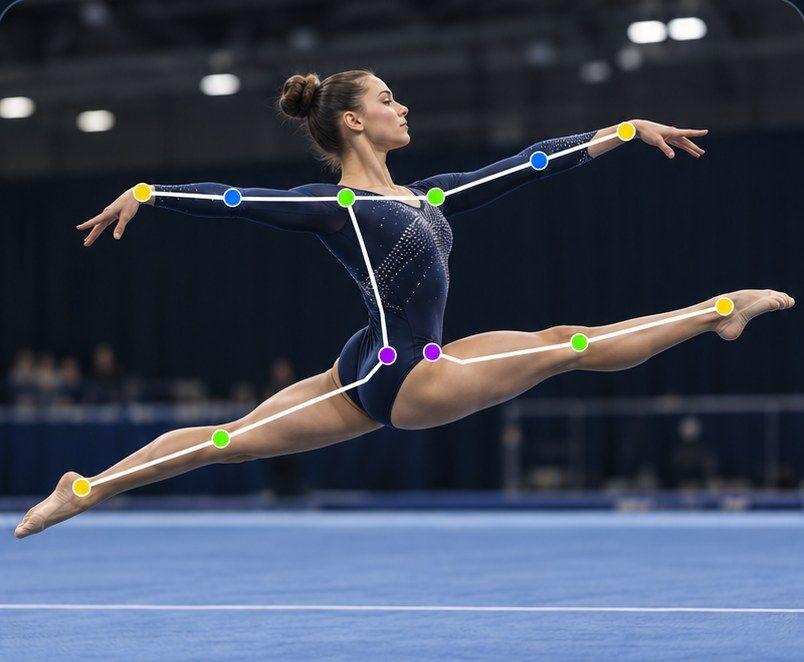
Film from the side, square to the direction of the leap, so the split line is flat to the camera.
Freeze the frame at the peak of the leap and check:
- The shape: is it clear and fixed at the highest point? For split leaps, how close is the split to the required amplitude?
- Height and amplitude: does the gymnast get enough air time to show the shape?
- Legs and feet: straight knees and pointed feet where the element requires them.
- Upper body and head: posture and position for the element, for example the back bend in a ring leap.
- Landing: light and controlled, without a heavy landing or an extra step.
Path Track in Sprongo traces the center of mass or any joint through the movement, with joint angles shown on the athlete. Trace the center of mass to see the height and shape of the flight, or trace the front and back ankle to compare the split from one attempt to the next.
Balances: what to check
Film from the side for leg height and body line, and from the front for alignment.
Common balances include passé, arabesque, attitude, side split balances and ring balances, on relevé or on a flat foot depending on the element.
Check:
- The shape is reached and clearly held, not passed through.
- The support: a stable support foot, without hopping or shuffling.
- Leg and body positions: hip alignment, height of the free leg and straight knees where required.
- Control in and out: a steady entry and exit, without losing balance.
A useful trick: line up two attempts in Compare and look at the moment the shape should be fixed. A balance that drifts usually shows up as a different leg height or upper body angle between the two.
Rotations (pivots): what to check
Film from the front or slightly to the side, so you can count the rotation and see the supporting foot.
Common rotations include passé pivots, attitude pivots, fouetté pivots, and rotations in penché and illusions.
Check:
- The full rotation: the base rotation and any additional rotations are complete. Step through frames to count.
- A fixed shape throughout the rotation.
- The support: on relevé for pivots, without the heel dropping, hopping or travelling.
- Control at the finish, without an extra step or loss of balance.
Path Track helps here too. Trace the supporting ankle or the center of mass to see whether the gymnast drifts across the carpet during the pivot.
Ask SIVA a focused question
SIVA, Sprongo's AI video assistant, answers a focused question about a clip using the movement data in it. Select a joint, choose the moment and ask, for example:
- "At the top of this split leap, how does my back leg compare with my front leg?"
- "Does my support heel drop during this passé pivot?"
- "Is my hip level in this arabesque balance?"
SIVA tells you what it noticed and suggests a next focus. It reads 2D video of the body, so camera angle matters, and it doesn't judge routines or give Code of Points scores. It supports the coach; it doesn't replace them.
Compare to see real progress
Flexibility and leap height improve slowly, so progress is easy to miss week to week. Once a month, compare a current leap or balance with one from the start of the season. In Sprongo, pick Compare from any clip, sync the two and slow them down, side by side or overlaid. Gymnasts love seeing their own progress, and it shows coaches which elements are ready to go into the routine.
Common mistakes
- Filming the leap from the front, where the split amplitude is hidden.
- Only filming the full routine, so each element is tiny on screen.
- Judging an element only at full speed, or only in slow motion. Watch both.
- Comparing clips filmed from different angles.
- Correcting everything at once. Pick one element and one focus per session.
Try it on your next practice
Sprongo PRO is $10 a month or $60 a year, with your own video library and analysis tools, a group of up to 3 people, Compare, Path Track and 3 SIVA feedbacks a month, on iPhone, Android, tablet and the web. For clubs, team plans give your coaches and gymnasts one shared library.
Get PRO, $10/month · App Store · Google Play
Coaching a club? See team plans.