Meet SIVA
Most athletes and coaches know the feeling: you've filmed the rep, you've watched it three times, and you're still not sure what to work on. SIVA is built for that moment.
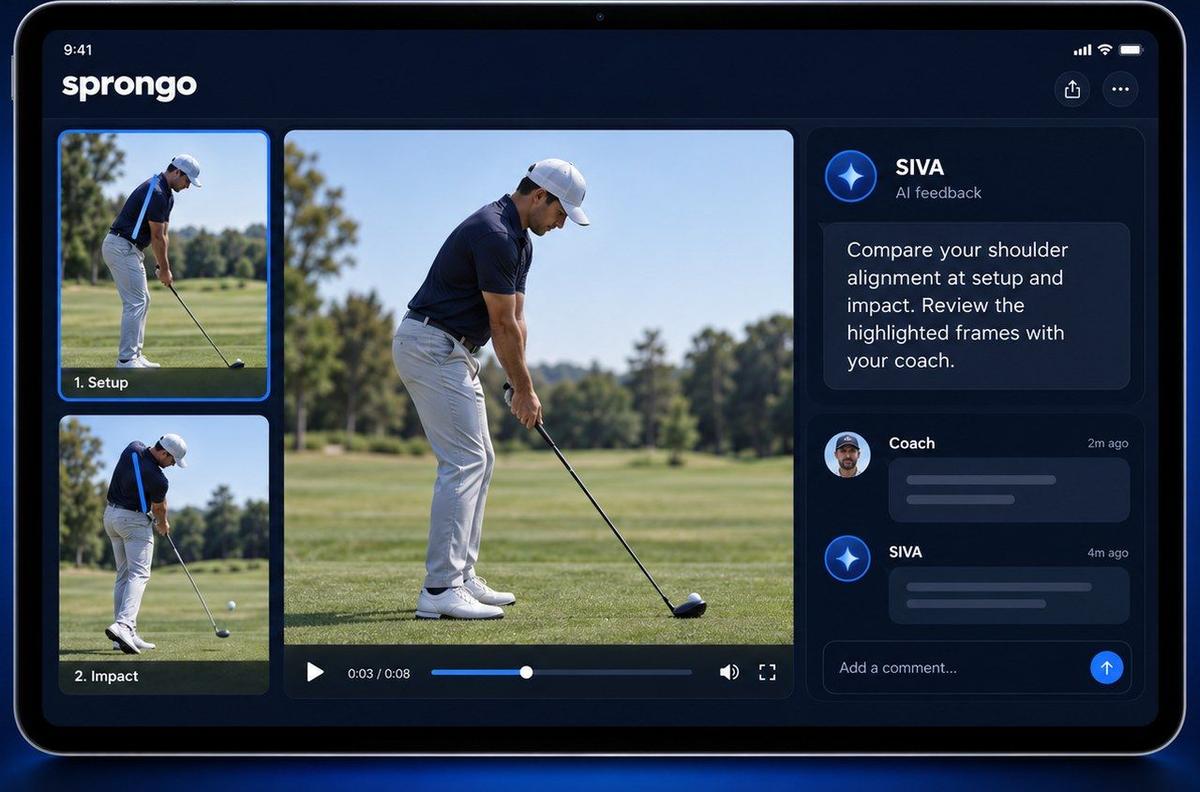
SIVA is Sprongo's AI video assistant. You pick the moment in a clip, ask a focused question, and SIVA answers using the movement data in your clip. It tells you what it noticed and suggests a next focus. It works on any sport you can film, and it's built into the same Sprongo app on iPhone, Android, tablet and the web.
How SIVA works, step by step
- Open a clip in your Sprongo library.
- Select a joint, such as the knee, elbow or hip.
- Choose the moment that matters, like full draw, foot plant or the middle of a turn.
- Ask SIVA a focused question in your own words.
- Review what SIVA noticed alongside the video, plus a suggested next focus.
That's the same "Select. Track. Ask SIVA." flow you see in our launch film, where a skier picks the knee in a GS turn and asks SIVA about it.
A real example: archery
Here's what a SIVA answer looks like, quoted from a real Sprongo screen.
The question: "Archery practice how is my stability and overall technique areas to improve"
What SIVA noticed: "Your feet and hips stay planted from 51 to 53.5, so your base looks steady. Your head dips around 52.0–52.25 as your hands rise."
Next focus: "Keep the head quiet and bring the bow up to the same face position."
Notice three things. SIVA points to specific times in the clip, so you can jump straight to the moment. It tells you what's working as well as what to change. And it ends with one practical focus, not a list of ten faults.
How to ask SIVA good questions
SIVA answers the question you ask, so a better question gets a better answer. A few tips:
- Be specific about the body part. "How does my front knee move?" beats "Is my swing OK?"
- Be specific about the moment. "From foot plant to contact" or "at full draw" tells SIVA where to look.
- Ask one thing at a time. Two focused questions are more useful than one vague one.
- Say what you're working on. "My coach says I lean back at the catch. Is that happening here?" gives useful context.
Example questions from the sports we've recorded in Sprongo:
- Skiing: "How does my knee move through this turn?"
- Archery: "Is my bow elbow stable at full draw?"
- Baseball: "What does my front knee do from foot plant to the swing?"
- Long jump: "What does my takeoff knee do from plant to toe-off?"
- Rowing: "How does my near knee move from the catch through the drive?"
- Race walking: "Does my lead knee straighten from foot contact until it's under my body?"
What SIVA can and can't see
SIVA reads 2D video. That means camera position and how clearly the athlete is visible affect what it can see. To get the most from it:
- Film with a stable camera, with the athlete fully in view.
- Use good light, with the light behind the camera.
- Pick the angle that shows the movement you're asking about. Side-on views show knee and hip bend best; front or back views show alignment.
- Avoid clips where other people walk in front of the athlete or the athlete is tiny in the frame.
If an answer seems off, check the footage first. A better clip usually fixes it.
SIVA supports your coach. It doesn't replace them.
SIVA is a second pair of eyes, not a coach. It's great for spotting what changed, pointing you to the right moment and giving you a focus for the next rep. Your coach brings the context SIVA doesn't have: your history, your goals, how you feel and what you've tried before.
The best way to use it is together. Ask SIVA, then share the clip and the answer with your coach. In Sprongo you can draw on the frame, leave a voice note and share the exact moment, so the conversation stays attached to the video.
Pair SIVA with Path Track and Compare
SIVA works best alongside Sprongo's other analysis tools:
- Path Track traces the center of mass or any joint through the movement, with joint angles shown on the athlete. It helps you see a pattern before you ask about it.
- Compare syncs two attempts side by side or overlaid, so you can check whether SIVA's suggested focus actually changed something on the next rep.
A simple loop: ask SIVA about one rep, work on the suggested focus, film the next rep from the same spot, then compare the two.
How SIVA credits work
Each SIVA answer uses 1 SIVA credit. Sprongo PRO includes 3 SIVA feedbacks each month. If you need more, additional SIVA credits are sold separately in the app.
Because you have a limited number each month, it pays to save SIVA for the questions that matter most: your best and worst reps, before and after a change, or a moment you and your coach disagree on.
Frequently asked questions
Does SIVA work for my sport? Video playback, comparison and feedback work across sports. SIVA's movement analysis depends on the footage: a stable camera with the athlete fully in view gives the best results.
Do I need special equipment? No. A phone on a steady surface is enough.
Is SIVA included in PRO? Yes, PRO includes 3 SIVA feedbacks each month, and you can buy extra credits in the app.
Try SIVA on your own footage
Sprongo PRO is $10 a month or $60 a year and includes your own video library and analysis tools, a group of up to 3 people, and 3 SIVA feedbacks every month, on iPhone, Android, tablet and the web.